Running your business

On paper one ticket gets keyed in three times: to invoice the customer, to check the hauler's bill, and into whatever spreadsheet says whether the job made money. Because the ticket is electronic, it is entered once. Here is where it lands.

One approved ticket, three numbers

Real screens out of the product, not diagrams.

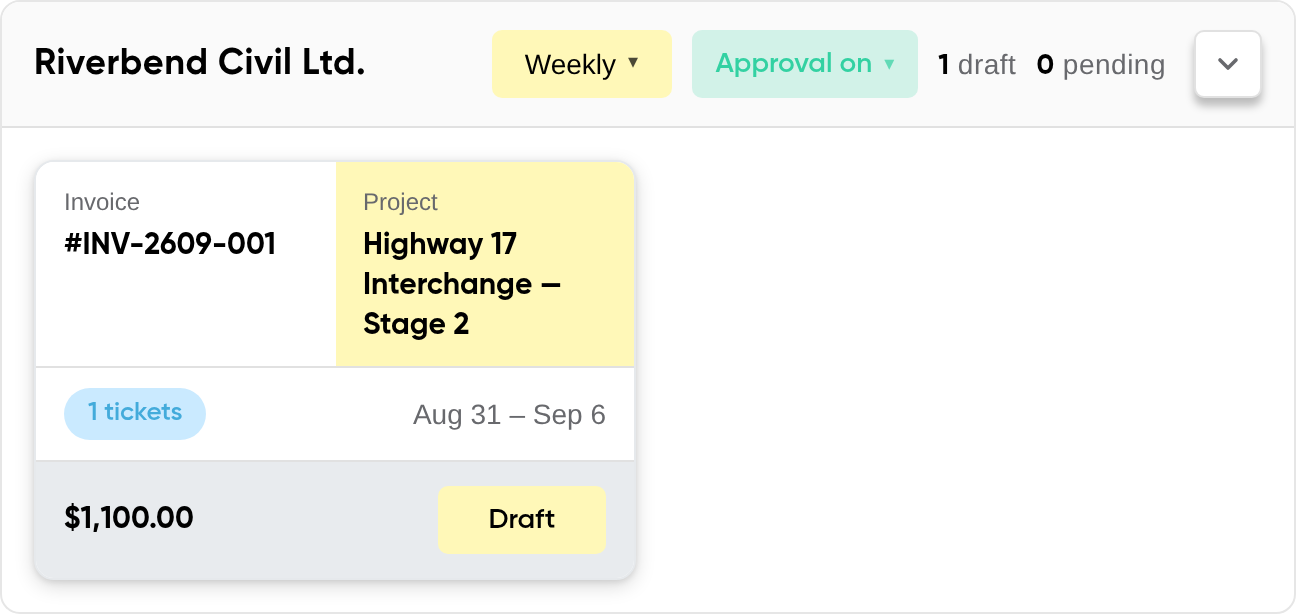
A customer panel on the invoicing dashboard: Riverbend Civil Ltd. on a weekly cycle with approval switched on, and one draft invoice, #INV-2609-001, built from a single ticket on the Highway 17 Interchange project for the period Aug 31 to Sep 6, valued at $1,100.00

The invoice

It assembles itself

One approved ticket on the Highway 17 job, priced at the rate already agreed with that customer, on their weekly cycle: $1,100.00, drafted without anybody opening a form.

Two tiles from the project report: vendor exposure of $1,003, of which $1,003 is awaiting agreement, $0 disputed and $0 not credited; and not yet settled, $0, with driver cost accrued and one vendor dispatch un-billed

The bill

What a vendor still owes you a bill for

$1,003 of vendor work is billed at a rate not yet agreed, and one finished dispatch has no bill against it at all — so you are told the margin is provisional rather than left to find out.

Three tiles from the project report: revenue $2,532, all of it not yet invoiced; total cost $2,103 including standalone hours inside projects; and margin on customer work of $429, 17.0% of revenue

The margin

What the job actually made

Revenue $2,532, cost $2,103, margin $429 — 17.0% — counted off the rounds the drivers actually closed, not off an estimate.

Invoices that assemble themselves out of approved tickets

Nothing is typed in twice. There is no “create an invoice” step. Every draft is assembled out of the approved tickets not yet invoiced, on that customer's own cycle — weekly, twice a month or monthly.

Agreed before it is owed. With approval switched on, the invoice goes to the customer to accept before it counts as receivable. A rejection comes back as a record and not a phone call: the reason they gave, the charges they disputed, and a link through to the tickets those charges came off. Payments are then recorded against the invoice, so what is outstanding is its own number.

One thing we do not do yet: emailing this invoice out is your click, not ours. You download the PDF and send it. In-app sending is built on the driver's own invoicing screen and not on this one — we would rather say so here than let you find out on the day you need it.

A customer panel on the invoicing dashboard: Riverbend Civil Ltd. on a weekly cycle with approval switched on, and one draft invoice, #INV-2609-001, built from a single ticket on the Highway 17 Interchange project for the period Aug 31 to Sep 6, valued at $1,100.00

What the job actually made, and what the number cannot see

A project profit-and-loss report: revenue, total cost, margin and cost per cubic metre for the Highway 17 Interchange job, the cost split by vendor, drivers, standalone hours, fuel and fixed truck cost, and a reconciliation panel listing the un-billed vendor dispatches and the lines still awaiting agreement

The volume is counted off the rounds the drivers actually closed, not off an estimate, so the job can be priced per cubic metre — and you can see whether a vendor moved it cheaper than your own trucks did. Any date range, out to CSV or PDF for whoever keeps your books.

And it tells you what it cannot see. Under the table sits every dispatch a vendor has finished but not billed for, every line billed at a rate you have not agreed to yet, and the driver cost accrued but not invoiced. The margin comes with its own margin of error instead of a number you are asked to trust.

The drivers and trucks the cost is made of

A truck is entered once and then dispatched, not retyped. Nickname, make, configuration, colour, plate and capacity go in on this screen — Unit 219 a 15.5 m³ Peterbilt tandem, Unit 214 a 22 m³ Kenworth tridem — and from then on that is what appears on the dispatch and on the ticket. Drivers are managed on the tab beside it.

The manage trucks and trailers screen for Fraser Valley Haulage, with tabs for business profile, users, drivers and trucks, and two rigs on it: Unit 219, a red Peterbilt tandem on plate CV 4835 rated 15.5 cubic metres, and Unit 214, a white Kenworth tridem on plate CV 4821 rated 22 cubic metres
A driver's week 32 time sheet: five ticket blocks in blue from Monday to Friday, two pink standalone blocks for yard and shop time, day totals from 9h 5m to 11h 50m, and a week total of 52h 30m split into 48h 30m on truck tickets and 4h standalone, still marked draft while it waits on ticket approvals

A driver's week is their own, not a re-entry of it. The blue blocks are time already on a truck ticket and come off the dispatch; the pink ones are standalone hours the driver added for yard or shop time.

Week 32 here totals 52h 30m — 48h 30m on tickets, 4h standalone — and stays a draft while the tickets behind it are still waiting on approval, so nobody is reviewing hours that could still change.

None of this is better than the tickets behind it, so it is worth seeing where they come from: how a project is planned, dispatched and tracked, and what the driver is actually doing on their phone when a round closes and the number you invoice comes into existence.